The short answer
Don’t copy your notes into Anki. Pick the facts and ideas you need to recall, write one short question per fact, and keep each answer as small as it can be while still being right. Use cloze cards for facts that live inside a sentence and basic cards for questions with one clear answer.
Understand the material first. A card is a cue to recall something you already understand, not the place to learn it for the first time.
Five rules for good cards
These come up again and again in advice on writing flashcards, and they’re the same problems that make cards fail later.
Understand it before you card it
If you can’t explain a paragraph in your own words, a card won’t fix that. Read it, sketch it or ask about it first, then make cards for the parts you need to recall. Cards made from things you don’t understand tend to get memorized as wording, and that wording falls apart when a question is phrased differently.
Minimum information
Keep each card as small as possible: the shortest question that has one answer, and the shortest answer that’s still correct. Big answers are slow to check and easy to half-remember.
- Front
- What was the Treaty of Versailles?
- Back
- The 1919 peace treaty between Germany and the Allies that ended the First World War, required reparations, limited Germany’s army and took territory.
- Front
- Which war did the Treaty of Versailles formally end?
- Back
- The First World War, between Germany and the Allies (signed 1919).
Tip: if you hesitate over which part of the back to say, the card is asking for too much.
One fact per card
A card that asks for a list fails whenever you miss one item, even if you knew the rest. Split lists and multi-part answers into separate cards, or use one cloze per item.
- Front
- What do HTTP status codes 200, 301, 404 and 500 mean?
- Back
- OK, Moved Permanently, Not Found, Internal Server Error
- Text
- HTTP status
{{c1::404}}means Not Found. - Shows as
- HTTP status [...] means Not Found.
Ask a question with one right answer
If the front could reasonably be answered several ways, you’ll guess which one the card wants. Add just enough context to rule out the others.
- Front
- house (Spanish)
- Back
- la casa
- Front
- Spanish for “house”, meaning the building
- Back
- la casa (not el hogar, which means home)
Put the “why” on the back
A short reason under the answer turns a bare fact into something you can reason your way back to. Keep it to a line, and keep it off the front so it doesn’t become a hint.
- Front
- Boiling point of water at the top of Mount Everest?
- Back
- About 70 °C
- Front
- Boiling point of water at the top of Mount Everest?
- Back
- About 70 °C. Air pressure is much lower up there, and water boils at a lower temperature when pressure drops.
Cloze or basic: which card type to use
| Question | Basic | Cloze |
|---|---|---|
| What it looks like | A question on the front, the answer on the back. | A sentence with one part hidden: “The Treaty of Versailles was signed in {{c1::1919}}.” |
| Use it for | Questions with one clear answer, “why” and “how” questions, vocabulary. | Facts that make sense in a sentence, definitions, formulas, short lists with one cloze per item. |
| Watch out for | Fronts vague enough to have several answers. | Hiding too much at once, or so little that the rest of the sentence gives it away. |
In a cloze note, each number makes its own card: c1, c2 and c3 give you three cards. Give two deletions the same number only when you want them hidden together.
For vocabulary you need in both directions, the Basic (and reversed card) note type makes a second card that asks the other way round. For labeled diagrams, Anki desktop 23.10 and newer includes an Image Occlusion note type that hides one label at a time.
Notes, slides, screenshots and missed questions
Lecture notes
Look for what you’re expected to recall: learning objectives, bold terms, definitions, comparisons and the steps of a process. Rewrite each one as a question in your own words instead of pasting a sentence. Skip background you only need to recognize.
Slides
One slide is rarely one card. A slide with a diagram and five bullets might give you an Image Occlusion card for the diagram, two cards for the bullets that matter, and nothing for the rest. Copy the text out instead of carding a screenshot of the whole slide, so you can trim it.
Screenshots
Crop to the part you need. An image works well on the back as context, or on the front when recognizing the image is the point, like the shape of a graph or a place on a map. If the content is mostly text, type it out so you can trim it and search for it later.
Practice questions you got wrong
Don’t copy the whole question onto a card: you’d end up memorizing that question, not the idea. Find the one fact or reasoning step you missed and card that. If you picked a tempting wrong option, add a card for the clue that separates it from the right one.
- Front
- A ball is thrown straight up. At the top of its path, what is its acceleration? (A) zero (B) 9.8 m/s² up (C) 9.8 m/s² down (D) it depends on the speed
- Back
- C
- Front
- A ball thrown straight up is momentarily still at the top of its path. Is its acceleration zero there?
- Back
- No. It’s still 9.8 m/s² downward: velocity is zero for an instant, but gravity keeps acting.
A worked example: one paragraph, three cards
Enzymes are proteins that speed up chemical reactions by lowering their activation energy. Each enzyme binds its substrate at the active site. High temperatures can denature an enzyme, changing the shape of the active site so the substrate no longer fits.
| Card | Front, or cloze text | Back |
|---|---|---|
| 1 · Basic | How do enzymes speed up chemical reactions? | By lowering the activation energy. |
| 2 · Cloze | An enzyme binds its substrate at the {{c1::active site}}. | Shown with the hidden part filled in. |
| 3 · Basic | Why does a denatured enzyme stop working? | Its active site changes shape, so the substrate no longer fits. |
Notice what was left out: “enzymes are proteins” is background you’ll meet everywhere, so it didn’t get its own card. The third card asks for the reason, not the word “denature”.
How many cards should you make?
There’s no right number per lecture. A useful test: would you mind forgetting this in a month? If not, skip it. Every new card brings reviews for months, so a smaller deck you keep up with is usually more useful than a bigger one you fall behind on.
If reviews are piling up, lower New cards/day in the deck options instead of skipping reviews. And when a card you made keeps failing later, the fix is usually in how it’s written: see why some Anki cards keep failing.
Make cards from anything with Anki-GPT
Anki-GPT’s Create tab drafts cards from whatever you paste, inside desktop Anki, and adds nothing until you approve it.
- Paste your material. Open Tools → Anki-GPT Studio… and choose the Create tab. Paste text, notes or a practice question you missed, or add up to three images (PNG, JPG, WebP or GIF): paste them, drag them in or choose files.
- Make cards. Add an optional focus, such as the step you got wrong, pick a deck, and choose Make cards. Each generation uses one AI answer.
- Edit 1–5 drafts. Each draft has a front and a back. Untick any you don’t want and edit the rest against your source.
- Add, or don’t. Nothing is added to your collection until you choose Add, and Edit → Undo reverses it. New cards are Basic cards tagged
AnkiGPT::captured.
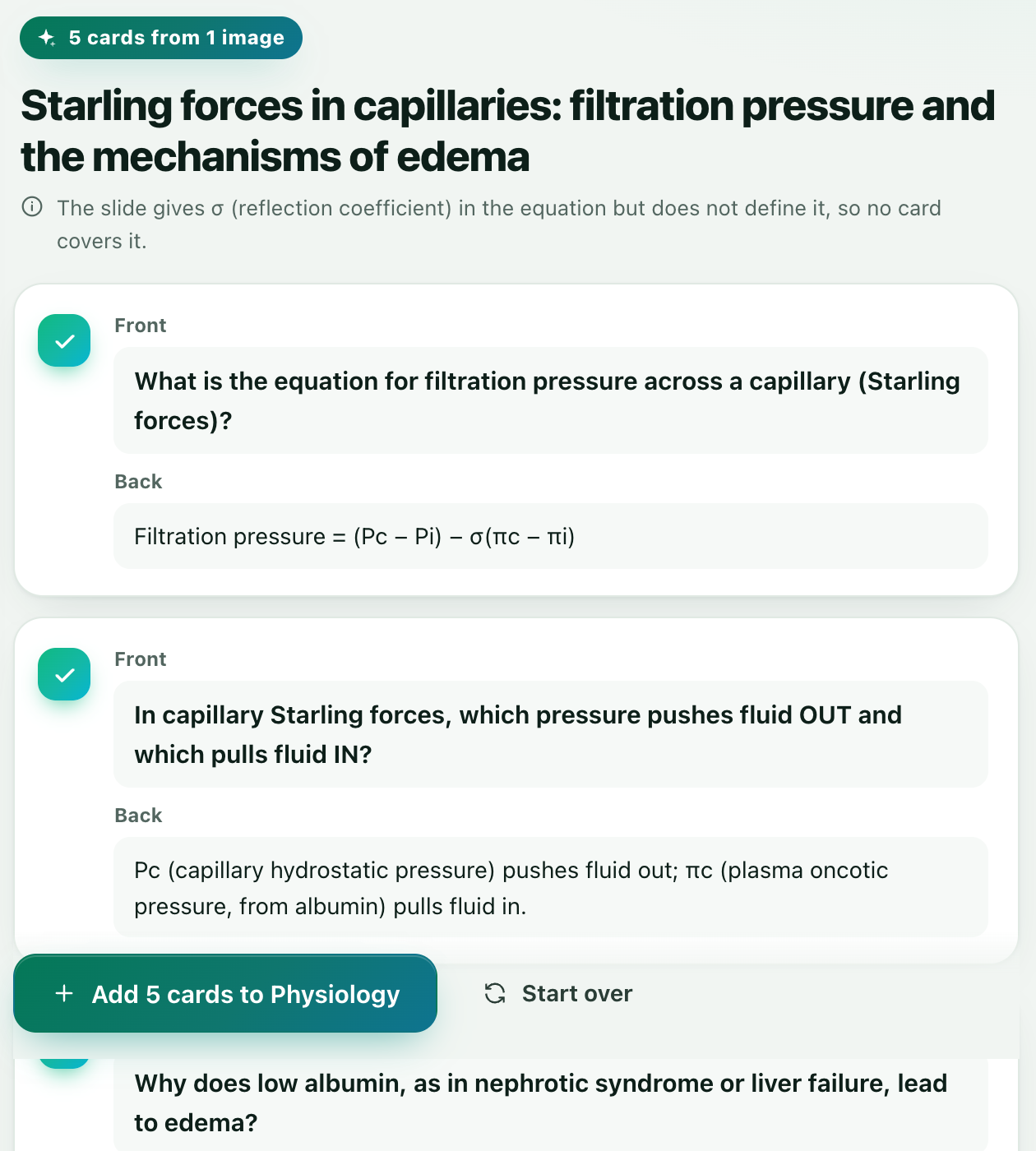
Already reviewing? Under any explanation in the review panel, Make card turns it into one to three cards the same way, tagged AnkiGPT::made.
AI drafts can be wrong or include detail your material didn’t say. Compare each card with your source and keep only the ones you’d have written yourself. Create doesn’t open PDF files: paste the text or a screenshot of the page. It sends the text and images you paste, plus the optional focus and the deck name, to the hosted service. What is sent.
FAQ
Should I use cloze or basic cards?
Use cloze for facts that make sense inside a sentence, like definitions, dates in context and formulas. Use basic for questions with one clear answer and for “why” and “how” questions. Many good decks mix both.
How do I make Anki cards from a PDF or lecture slides?
Copy the text you need out of the PDF or slide, pick the facts you have to recall, and write one question per fact. Anki-GPT’s Create doesn’t open PDF files directly: paste the text or a screenshot of the page, up to three images at a time.
Can I make Anki cards from a screenshot?
Yes. You can paste a screenshot into any card as an image. With Anki-GPT, paste or drag up to three screenshots into Create and it drafts 1–5 cards from them for you to edit before adding.
Will Anki-GPT add cards without asking?
No. Drafted cards are added only when you choose Add, and Edit → Undo reverses it. Each generation uses one AI answer.
Should I make cards from practice questions I got wrong?
Yes, but don’t copy the question. Make a card for the specific fact or reasoning step you missed, and one for the clue that separates the right answer from the option you picked.
Can it make cloze cards?
Create and Make card add Basic cards with a front and a back. If you’d rather have a cloze, copy the text into a new Cloze note and mark the part to hide.
Draft your next cards from your own notes.
Free to try with 30 AI answers. No API key, no sign-up. For desktop Anki 2.1.65 or newer.
- In Anki, choose Tools → Add-ons → Get Add-ons.
- Paste 853364085, then restart Anki.
- Open Tools → Anki-GPT Studio… and choose Create.