The short answer
A card that keeps failing usually has one of four problems: the prompt is ambiguous, there’s too much on one card, it interferes with a look-alike, or you memorized it without understanding it. Pressing Again a tenth time doesn’t change any of these. Rewriting the card does.
Anki eventually tags a card like this as a leech. This page is about spotting the cause early, tagged or not. For leech settings and tags, see the Anki leech guide.
Find the cards you fail most
You don’t have to wait for the leech tag. These Browser searches surface cards that are already struggling:
| Search | What it finds |
|---|---|
prop:lapses>3 | Cards that have lapsed, gone from review back to relearning, more than three times. |
rated:7:1 | Cards you pressed Again on in the last 7 days. |
tag:leech | Cards Anki has already tagged as leeches. |
Add the Lapses column and sort by it to put the worst cards first. Start with five, not fifty: fixing a few cards well is more useful than skimming many.
Read the way you fail it
Before you rewrite anything, notice what happens in your head when you miss the card. The kind of mistake points to the cause.
| When you miss it, you… | Likely cause | Fix |
|---|---|---|
| know the topic but aren’t sure what the card wants | An ambiguous prompt | Ask one specific question |
| get most of the answer but miss a part | Too much on one card | Split it, or one cloze per item |
| give the answer that belongs to another card | Look-alike interference | Put the deciding clue on the front |
| can recite it but couldn’t explain or use it | No understanding | Ask why, and test an application |
Two other patterns show up less often. If you draw a complete blank even right after seeing the answer, the card may rest on an idea you never learned; the leech guide covers missing foundations. And if you can’t find anything wrong with the card, it may just need a few more reviews.
The four causes, and how to fix each
Each one below has a different fix. The examples use different subjects, but the patterns are the same in any deck.
An ambiguous prompt
What it feels like: you know plenty about the topic, but not which part the card is after, so you give a true answer that isn’t the one on the back.
Why it happens: the front is a label, not a question. A single word, a command name or a topic heading can be asked about in several ways.
- Front
git rebase- Back
- Moves commits onto another base
- Front
- On a feature branch, what does
git rebase maindo with your branch’s commits? - Back
- Replays them, one by one, on top of the latest commit on main.
Fix: turn the label into one specific question, with just enough context that only one answer fits. Test it by imagining a classmate reading the front cold: would they give your back?
Too much on one card
What it feels like: you get three parts out of four, and still have to press Again.
Why it happens: the back is a list, or a sentence holding several separate facts. The card fails whenever any one piece is missing, so its weakest part sets its fate.
- Front
- What were the four long-term causes of the First World War?
- Back
- Militarism, alliances, imperialism, nationalism
- Front
- MAIN, the long-term causes of the First World War: what does the A stand for?
- Back
- Alliances: treaties that drew more powers into what began as a regional conflict.
Fix: split it into one fact per card. If you need the whole list, keep one card for the mnemonic and one per item, or use a cloze note with a separate number for each item.
Look-alike interference
What it feels like: you answer confidently, and it’s the answer to a different card.
Why it happens: two cards share most of their wording, so the front doesn’t contain anything that tells them apart. Learning one makes the other harder.
- Front
- Stalactite?
- Back
- Hangs from the ceiling of a cave
- Front
- Stalagmite?
- Back
- Rises from the floor of a cave
- Front
- Stalactite or stalagmite: which one hangs from the ceiling of a cave?
- Back
- Stalactite. Hook: stalactites hold tight to the ceiling (c); stalagmites grow up from the ground (g).
Fix: put the deciding clue on the front and the contrast on the back. A single card that asks you to choose between the two can be easier to keep straight than two cards that each ask for one. For more fixes and examples, see how to tell apart Anki cards you keep mixing up.
Memorized without understanding
What it feels like: you can say the answer, but you couldn’t explain it, and it slips the moment a question is worded differently.
Why it happens: the card asks for a label, so that’s all you learned. With nothing behind the label, there’s nothing to rebuild it from when it fades.
- Front
- Why is the sky blue?
- Back
- Rayleigh scattering
- Front
- Why does the sky look blue at midday but red and orange at sunset?
- Back
- Air scatters short (blue) wavelengths far more than long (red) ones. At midday, scattered blue reaches you from all over the sky. At sunset, sunlight crosses so much air that most of the blue is scattered away before it reaches you.
Fix: ask for a reason or an application instead of the name, and add a one-line “why” on the back. Asking “why” during review helps you find these cards: see how to explain Anki cards while you review.
Is it the card, or your workload?
If many unrelated cards start failing at once, look at your load before rewriting all of them. Adding more new cards a day than you can keep up with, coming back from a long break, or reviewing when you’re exhausted can all raise failures across the board.
Deal with those first, in your deck options and your routine. Then rewrite the individual cards that still keep failing. And when you make new cards, the same rules help them hold up in the first place: see how to make good Anki cards from your notes.
Let Card Rescue triage them for you
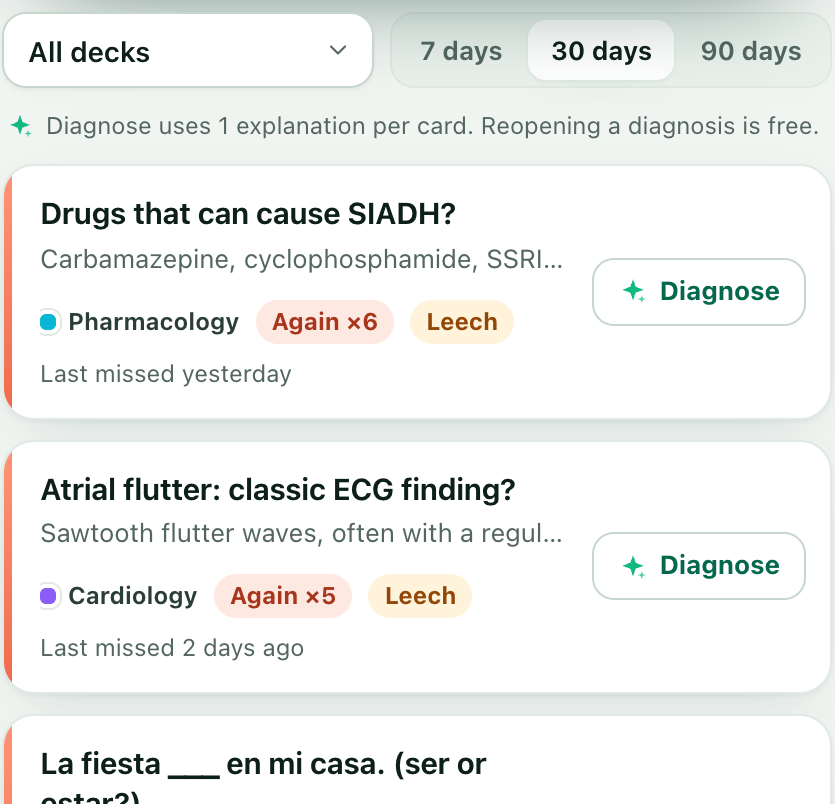
Card Rescue, in Anki-GPT 0.7, does the steps on this page inside desktop Anki.
- It ranks your most-failed cards. It reads Anki’s own review history on your computer, read-only, and lists the cards you pressed Again on most in the last 7, 30 or 90 days, then by total lapses and time spent, plus anything tagged
leech. Building the list uses no AI answers. - It diagnoses one card. Click Diagnose for the likely cause (unclear question, too much at once, look-alike confusion, missing foundation, memorized without meaning, ambiguous answer, or just needs time), the idea explained plainly, and a memory hook. Each diagnosis uses one AI answer; reopening it later is free.
- It suggests a rewrite or a split. Your original sits side by side with the suggestion, every change is highlighted, and you can edit anything.
- You decide. Apply to this card, Add as new card (suspending the original only if you tick that box), or add the split cards. Nothing changes until you click, and Edit → Undo reverses it.
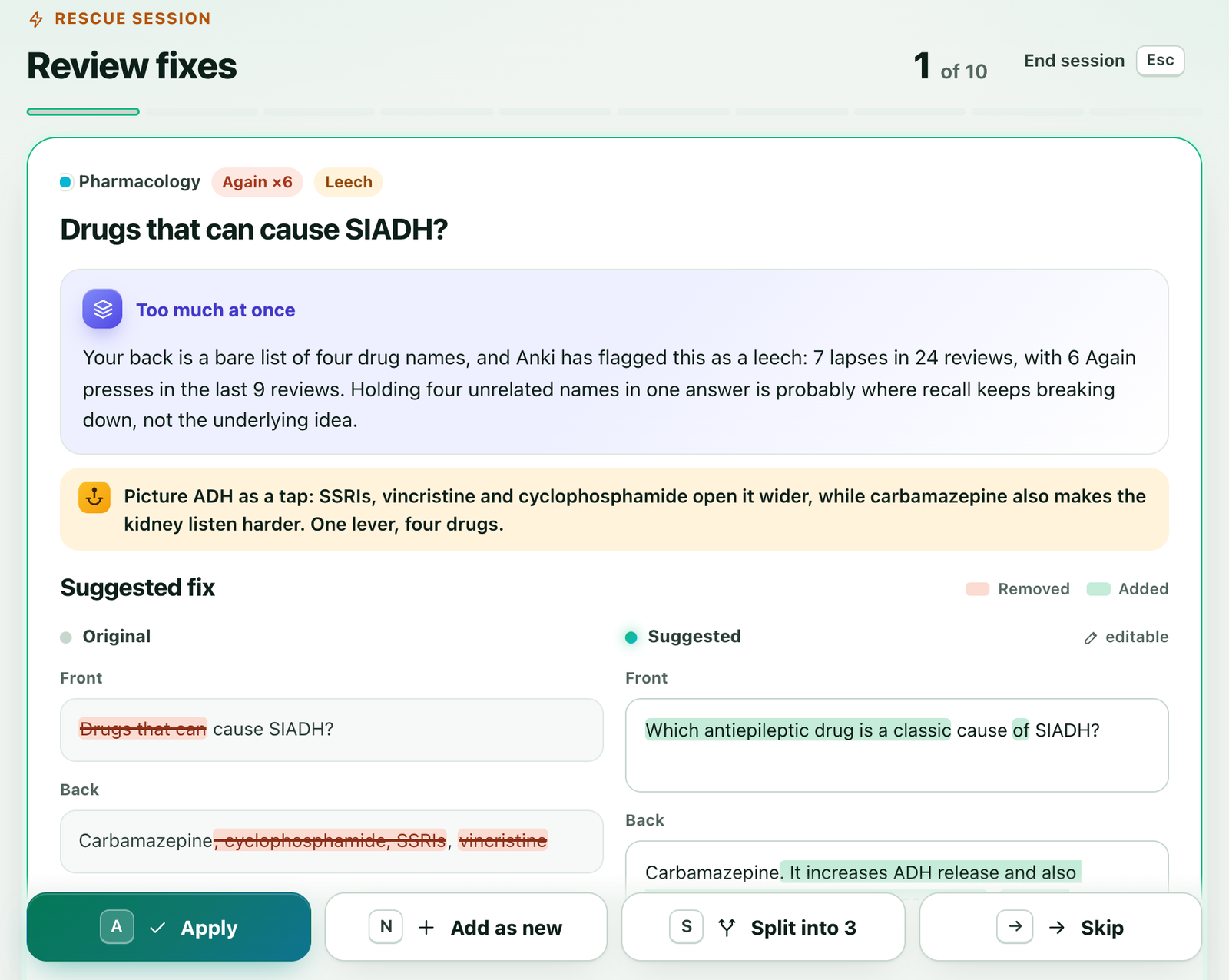
Card Rescue never changes your review schedule or review history. Apply replaces the Front and Back text only; for cloze notes, single-field notes or cards with images, audio or video in those fields, use Add as new card instead. It doesn’t remove the leech tag or unsuspend cards. AI can be wrong, so the original card stays beside the suggestion.
Diagnose sends the card’s text, fields and tags, its deck and note-type names, its review counts for the chosen window, and up to three other cards from the same deck that you also missed recently and that share a word with it, shortened. What is sent.
FAQ
Why do I keep forgetting the same Anki card?
Usually because of the card, not your memory. The four common causes are an ambiguous prompt, too much on one card, interference from a look-alike card, and an answer memorized without understanding. Each one has a different fix.
Should I delete cards I keep forgetting?
Only if you no longer need to know them. If you do, rewrite or split the card instead. Suspending takes a card out of your reviews without deleting anything, so you can decide later.
Should I edit the card or add a new one?
Editing keeps the card’s review history and lapse count. Adding the rewrite as a new card and suspending the old one gives you a fresh start. Both work; a split always means new cards.
How do I find the cards I fail most in Anki?
In the Browser, search prop:lapses>3 or rated:7:1, then add the Lapses column and sort by it. Card Rescue in Anki-GPT builds this kind of list from your review history for you, without using any AI answers.
Is a card I keep forgetting the same as a leech?
Not always. A leech is Anki’s tag for a card that has reached the leech threshold, 8 lapses by default. Cards you keep forgetting include leeches and the ones heading that way. The Anki leech guide covers the settings.
Does Card Rescue change my review schedule?
No. It reads your review history without writing to it. A card changes only when you click Apply or Add, Apply replaces the Front and Back text only, and Edit → Undo reverses it.
Find the cards you keep forgetting.
Free to try with 30 AI answers. No API key, no sign-up. For desktop Anki 2.1.65 or newer.
- In Anki, choose Tools → Add-ons → Get Add-ons.
- Paste 853364085, then restart Anki.
- Open Tools → Anki-GPT: Rescue struggling cards…