The short answer
Two cards that look alike compete for the same answer. Learning one makes the other harder to recall, so you give the right answer to the wrong card. This is called interference. Pressing Again doesn’t fix it, because nothing on either card tells the two apart.
The fix is to make the difference part of what you review: add a deciding cue to each card, make the front ask about the difference, add a contrast card, and avoid near-duplicate fronts.
Why look-alike cards keep failing
Recall is cued by similarity. When a front looks like another card you know, both answers can come to mind, and the one you’ve seen more often or more recently often wins. Psychologists call this interference: an older card can get in the way of a newer look-alike, and a newer one can push out an older one.
Spaced repetition doesn’t fix this by itself. Anki schedules each card on its own, so two look-alikes rarely come up together. Each time you review one alone, you practice the part they share, not the small detail that tells them apart.
That’s how look-alikes cause repeated lapses. You fail one, relearn it, and the next time its twin comes up, you fail that one instead. Left alone, both can end up as leeches; the Anki leech guide covers what that tag means. Look-alike interference is also one of the four causes in why you keep forgetting the same cards.
How to spot it
The clearest sign: you answer with the other card’s answer. Not a blank and not half an answer, but a confident answer that belongs to a different card. Other signs:
- You hesitate between two answers, and pick the wrong one about as often as the right one.
- An older card starts failing soon after you add a new card on a similar topic.
- The two fronts share most of their words, or differ by one word, a number or an ending.
- The two cards tend to fail in the same weeks.
Look-alikes turn up in every subject. Here are four common ones, and what actually tells each pair apart:
| Look-alikes | Why they get swapped | What decides it |
|---|---|---|
| ser vs estar (Spanish) | Both mean “to be” in Spanish. | Ser is for what something is, including where an event takes place. Estar is for states, conditions and where a person or thing is. |
| metoprolol vs propranolol | Two beta blockers with the same -olol ending. | Metoprolol blocks β1 only (β1-selective). Propranolol blocks β1 and β2 (non-selective). |
== vs === (JavaScript) | Two JavaScript equality operators, one character apart. | == converts types before comparing; === doesn’t. So '1' == 1 is true and '1' === 1 is false. |
| Ottawa vs Toronto | Canada’s capital, and its best-known city. | Ottawa is the capital of Canada. Toronto is the largest city, and the capital of the province of Ontario. |
Four ways to tell them apart
Each fix puts the difference where you’ll practice it. Use one, or combine them.
Add a deciding cue to each card
What it is: the words on the card that decide the answer, plus a one-line rule that says why. Put it on the back, so you check it every time you review.
- Front
- La fiesta ___ en mi casa. (ser / estar)
- Back
- es
- Front
- La fiesta ___ en mi casa. (ser / estar)
- Back
- es. Cue: “La fiesta”. Where an event takes place takes ser; where a person or thing is takes estar (Mi casa está en Lima).
Tip: quote the cue from the card itself, then give the rule. A cue that only restates the answer (“La fiesta takes es”) won’t help next time. The reason will.
Make the front ask about the difference
Why it helps: if the front asks for a general description, you can pass it with the part both cards share. Ask about the one thing that differs instead.
- Front
- Metoprolol
- Back
- β1-selective beta blocker
- Front
- Propranolol
- Back
- Non-selective beta blocker
- Front
- Metoprolol: does it block β1 only, or β1 and β2?
- Back
- β1 only: it’s β1-selective, also called cardioselective. Propranolol blocks both.
Tip: ask “which receptors?”, not “what is it?”. Both drugs are beta blockers, so “what is metoprolol?” can be answered with what they share. “Which receptors?” can only be answered with what tells them apart.
Add a contrast card: “X vs Y: which one…?”
Why it helps: a contrast card puts both look-alikes on one front and asks you to choose. You practice the decision itself, which two separate cards never test.
- Front
- What does
==do in JavaScript? - Back
- Checks whether two values are equal
- Front
- What does
===do in JavaScript? - Back
- Checks whether two values are equal, without type conversion
- Front
- JavaScript,
==or===: which one converts types before comparing? - Back
==. So'1' == 1is true, but'1' === 1is false, because===compares without converting.
Tip: make one contrast card for each direction (“which one doesn’t convert?”), so you can’t learn it as “always the first one”. Keep the original cards if they test something the contrast card doesn’t.
Avoid near-duplicate fronts
Why it helps: when two fronts differ by one word, that word is all you have to go on, and it’s easy to read past. Make the difference impossible to miss, or merge the pair into one contrast card.
- Front
- Capital of Canada?
- Back
- Ottawa
- Front
- Largest city in Canada?
- Back
- Toronto
- Front
- Canada’s capital isn’t its largest city. Which city is the capital?
- Back
- Ottawa. Toronto is the largest city, and the capital of the province of Ontario.
Tip: before you add a card, search your collection for its key words. If a near-twin turns up, add a deciding cue to both, or write one contrast card instead of a second look-alike.
Find the look-alikes in your deck
Look-alikes usually share a word. Search for that word in the Browser and read the results side by side:
| Search | What it finds |
|---|---|
olol | Every card containing “olol”, such as all your beta blockers. A plain search matches inside words too. |
olol rated:30:1 | Only the ones you pressed Again on in the last 30 days. |
front:*capital* | Notes whose Front field contains “capital” anywhere. |
If you’d have to stop and think about which answer goes with which card, you’ve found a pair. To list your most-failed cards first, see find the cards you fail most.
Untangle look-alikes in Anki-GPT
Untangle look-alikes is new in Anki-GPT 0.10 and labeled Beta. It does the steps on this page inside desktop Anki, as part of Card Rescue, which finds the cards you fail most and diagnoses why.
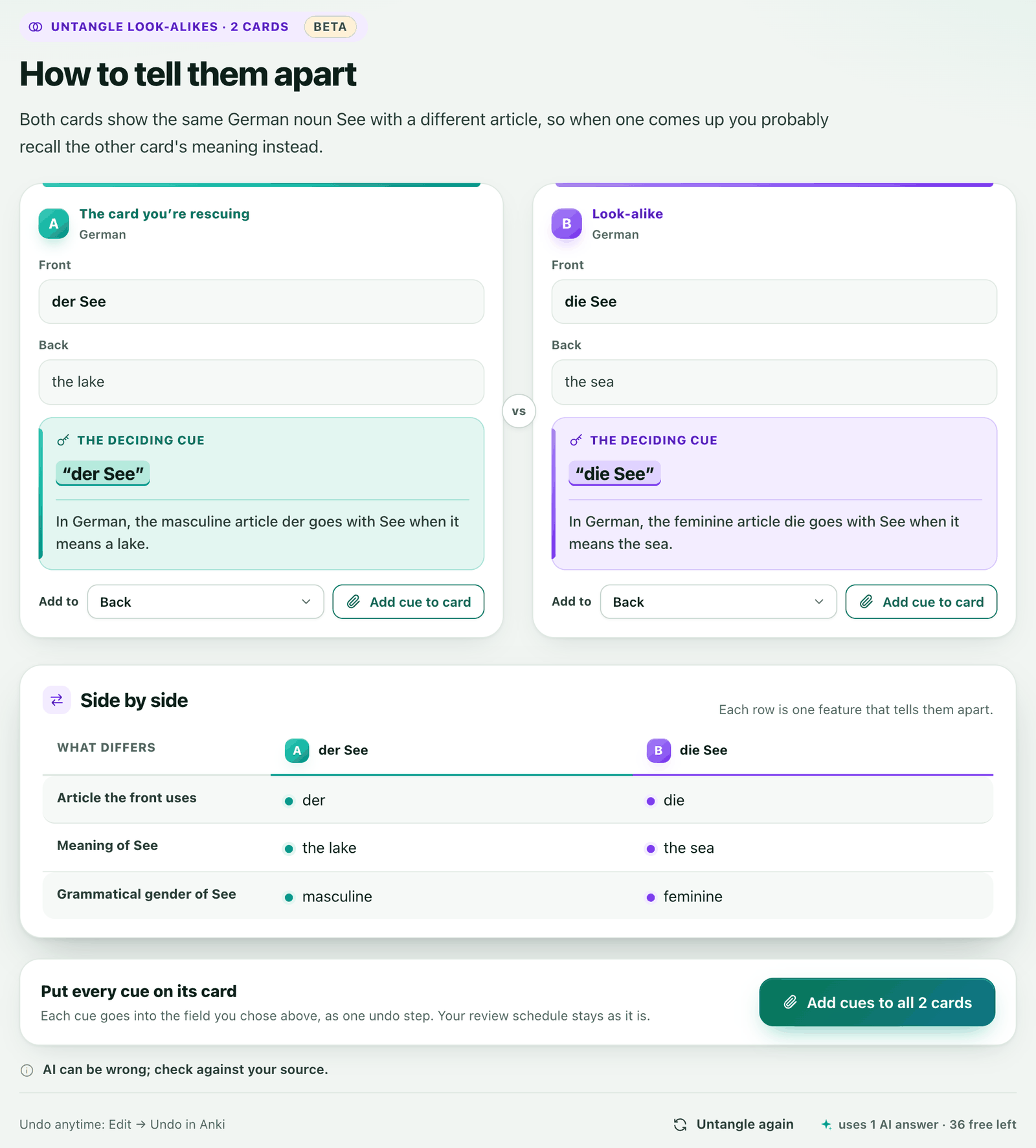
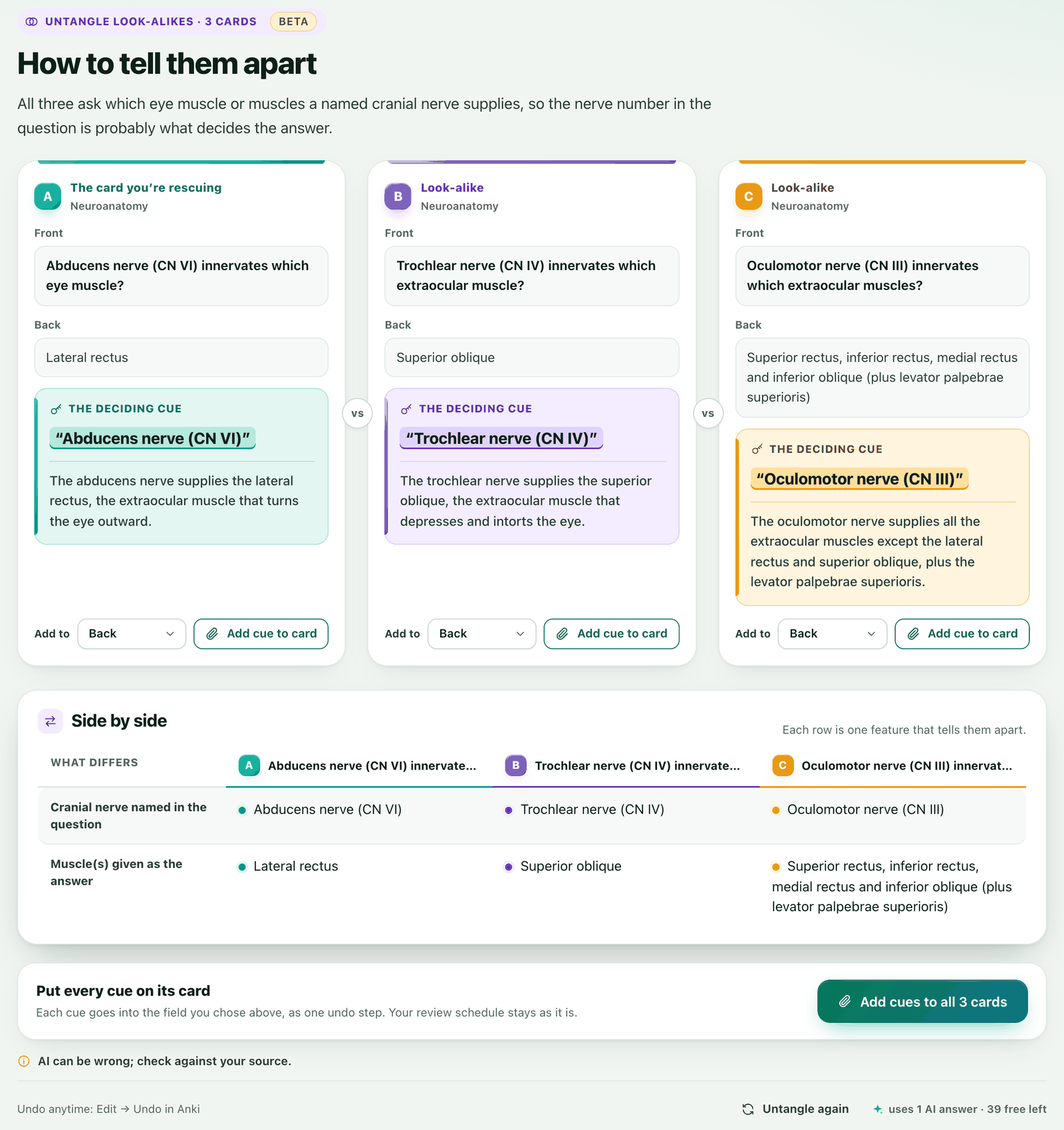
- Card Rescue spots the pair. When a diagnosis says look-alike confusion, it offers Untangle. Pick one or two of the look-alikes it found, and Untangle shows 2 or 3 cards side by side.
- Each card gets its deciding cue. The deciding words, quoted from the card, plus a one-sentence rule that tells it apart from the others. Below them sit a contrast table, with one row for each difference, and an optional memory hook.
- You choose what goes on your cards. Add cue to card pins the cue into a field you choose, Back by default, so it syncs to AnkiMobile and AnkiDroid like any other field. Add cues to all adds every cue as one undo step. Your review schedule is never changed.
- Or start from the Browser. Select 2 or 3 cards you keep mixing up, right-click and choose Untangle with Anki-GPT.
What it costs
Each untangle uses 1 AI answer, and reopening a saved one is free. Untangle also has its own fair-use limit:
| Plan | Untangles |
|---|---|
| Free trial | 15 during the trial |
| Plus | 70 a month |
| Pro | 180 a month |
See plans and pricing for everything else each plan includes.
AI can be wrong. The original cards are always shown beside the cues, and nothing is added until you click, so check each cue against your source first. Untangle never changes your review schedule or review history, and Edit → Undo removes a cue you added.
Untangle sends the text, fields and tags of the 2 or 3 cards you chose, with their deck and note-type names, to the hosted service. It doesn’t send their review history. Requests and responses may be cached there for up to 30 days. What is sent.
FAQ
Why do I keep mixing up two Anki cards?
Because they look alike and nothing on either card tells them apart. Recalling one brings the other’s answer to mind, and Anki schedules them separately, so you rarely practice the difference. This is called interference.
How do I tell similar Anki cards apart?
Put the difference on the card. Add a deciding cue to each one, make the front ask about what differs, add a contrast card that asks you to choose between them, and avoid fronts that differ by only one word.
Should I merge two look-alike cards into one?
Sometimes. A contrast card that asks “X or Y: which one…?” practices the decision directly. Keep the separate cards as well if each one tests something the contrast card doesn’t.
What is interference in spaced repetition?
It’s when similar material competes in memory. An older card can make a newer look-alike harder to learn, and a newer one can make an older one harder to recall. It’s one reason the same pair of cards can keep failing.
Does Untangle change my cards or my review schedule?
It never changes your review schedule. A card changes only when you click Add cue to card or Add cues to all, which adds the cue to the field you choose (Back by default). Add cues to all is one undo step, so Edit → Undo reverses it.
Can I untangle cards that Card Rescue didn’t flag?
Yes. In the Browser, select 2 or 3 cards, right-click and choose Untangle with Anki-GPT.
How much does Untangle cost?
Each untangle uses 1 AI answer, and reopening a saved one is free. Fair use is 15 untangles during the free trial, 70 a month on Plus and 180 a month on Pro.
Untangle the cards you keep mixing up.
Free to try with 30 AI answers. No API key, no sign-up. For desktop Anki 2.1.65 or newer.
- In Anki, choose Tools → Add-ons → Get Add-ons.
- Paste 853364085, then restart Anki.
- Open Tools → Anki-GPT: Rescue struggling cards…, or select 2 or 3 cards in the Browser and right-click.