Practical answers
Anki-GPT help and FAQ
What the trial includes, how to confirm access, and what happens to your saved explanations and study data.
Updated for version 0.6.1 · October 8, 2026
Getting started? Follow the installation and first-explanation guide.
How much does Anki-GPT cost?
Anki-GPT includes 75 free hosted explanations. After the trial, optional Supporter access is $3/month or $24/year. No API key setup is needed.
Open Tools → Anki-GPT: Settings → Account and choose Check Usage to refresh your access status and remaining trial explanations. The same tab has the monthly and annual access buttons.
Reopening an explanation already saved locally does not use another hosted explanation. New requests, including follow-up questions, can use hosted explanations.
I completed checkout. How do I confirm access?
Finish payment in the checkout page opened by Anki-GPT, then return to Settings → Account. Anki-GPT checks for activation; choose Check Usage to refresh the result yourself.
Opening checkout alone does not activate Supporter access. Access is confirmed after the service verifies the payment and subscription state. If the status is still pending, check that checkout was completed and refresh your usage status. If it remains unresolved, ask in the support thread.
Where can I manage my subscription?
Open Tools → Anki-GPT: Settings → Account and choose Manage subscription. This opens the hosted subscription management page, where you can review or change your plan and manage cancellation.
Use Check Usage when you return to Anki to refresh your access status.
Does Study change my Anki review schedule?
No. Study’s Know it and Again ratings set local reminders for the explanations you have saved. They do not change your Anki card schedule.
Save a useful explanation with Save to Study. In Study, search your saved concepts or filter by Due and Needs work. Practice keeps the explanation hidden until you reveal it, so you can try recalling the idea first.
Where are saved explanations and practice progress stored?
Study bookmarks and practice progress stay in your local Anki profile. Reopening a saved explanation does not send a new explanation request or spend another hosted explanation.
Each Anki profile keeps its own Study data. Do not assume that Study progress follows you to another profile or device.
What information is sent when I ask a question?
New AI requests send card content, including text and fields, tags, attached images, your question, and relevant conversation and review context to the hosted service. These requests need an internet connection.
Request context and responses may be cached by the hosted service for up to 30 days. Your saved Study bookmarks and practice progress remain in your local Anki profile.
Do not submit patient identifiers, private patient or client data, restricted exam material, or other content you are not allowed to share. AI can make mistakes; check important facts against trusted sources.
Does Anki-GPT work on phones or in AnkiWeb?
Anki-GPT is an add-on for desktop Anki 2.1.65 or newer. Its reviewer panel is not an AnkiMobile, AnkiDroid, or AnkiWeb feature.
It supports text cards, image cards, and diagrams, with up to three attached card images. Choose Simple, Exam, or Deep, and use Auto, Front, or Back to select the card context.
How do I update Anki-GPT?
Open Tools → Add-ons in desktop Anki and use Anki’s update check. After installing an update, restart Anki so it loads the new add-on files.
Version 0.6.1 improves payment confirmation and subscription management, and fixes issues involving replaced card images and separate Anki profiles. See the AnkiWeb listing for the downloadable add-on.
If the GPT button does not appear after installation, confirm that the add-on is enabled in Tools → Add-ons and restart Anki before beginning a review.
What do the demos show?
The medical demo uses an original Step 1-style pharmacology card. It shows an explanation, saving to Study, hidden-answer practice, and saved progress. The mathematics demo shows the workflow with a different subject.
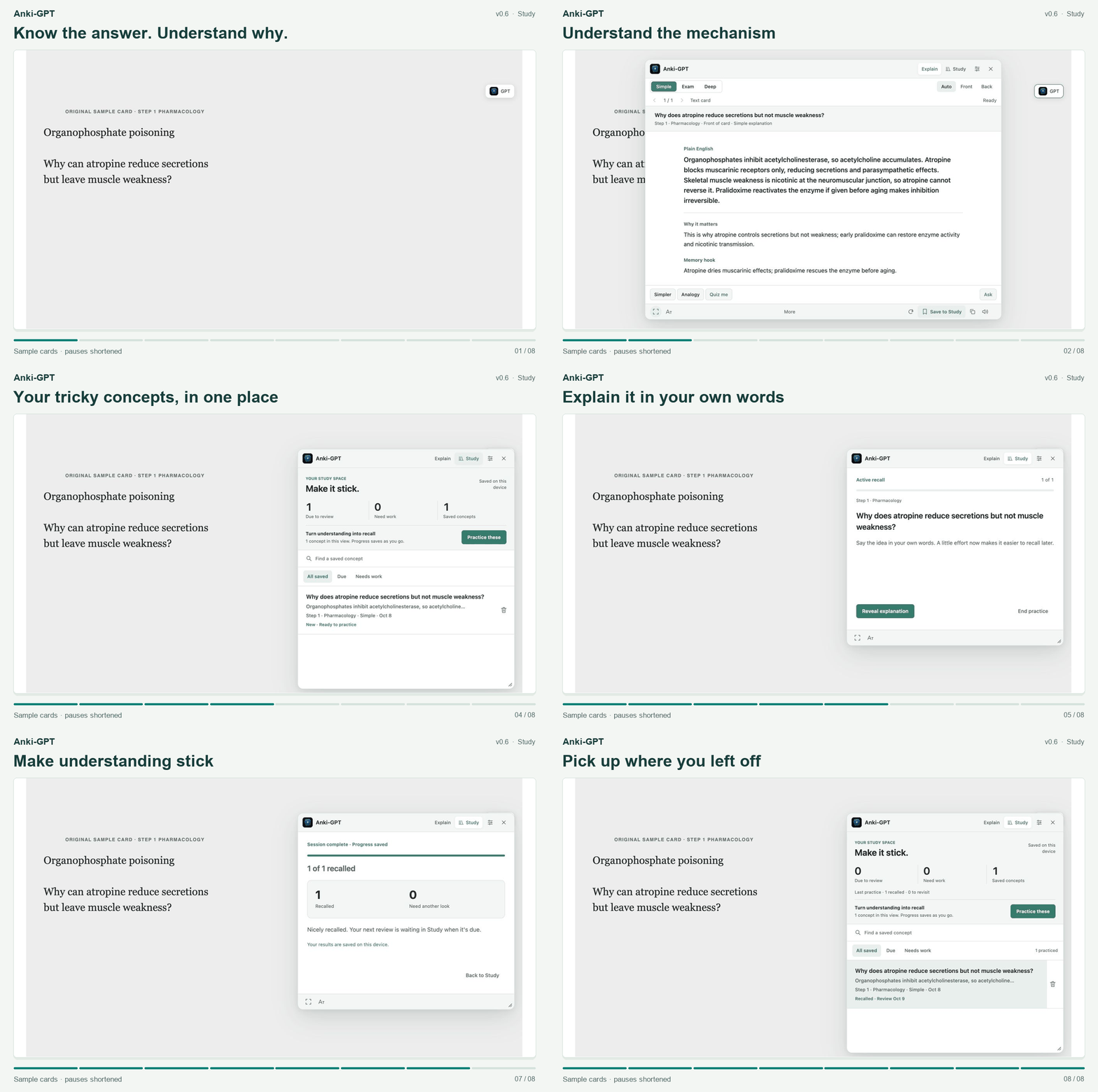
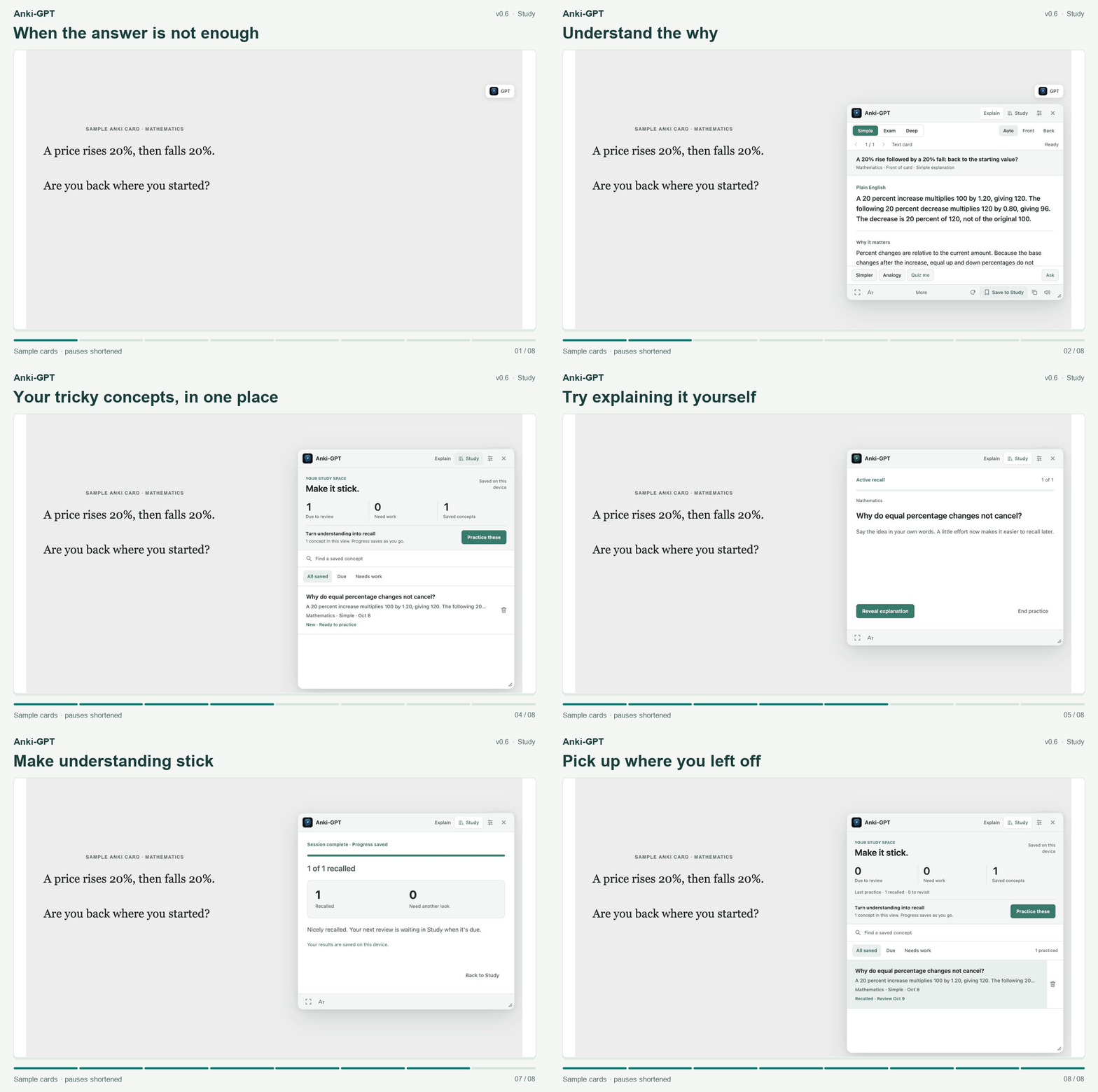
These are sample cards, and pauses are shortened. They illustrate how to use the add-on; they do not establish a response-time or answer-accuracy guarantee.
Where can I report a bug or ask for help?
Post in the Anki-GPT support thread on Anki Forums. Include your Anki version, Anki-GPT version, and a short description of what you expected and what happened. A de-identified sample card or screenshot can help explain the issue.
The forum is public. Keep payment details, access keys, and private card content out of your post.