The short answer
Memorizing is being able to give the answer when the card asks for it. Understanding is knowing why it’s true, when it applies and how it differs from things that look like it. Anki trains the first directly. You can add the second by asking “why” on the cards that need it, not on every card.
Answer first, then ask. Put the one-line reason where you’ll see it next time, and move on.
Understanding vs memorizing
| Situation | Only memorized | Understood |
|---|---|---|
| Saying the answer | Only in the card’s exact words | In your own words |
| A reworded question | Throws you | You can still answer it |
| A look-alike card | You mix them up | You know what separates them |
| “Why is that right?” | No idea | You can give the reason in a sentence |
Memorizing isn’t bad. Plenty of cards are plain facts, like a word, a date or a keyboard shortcut, and don’t need a reason at all. The trouble starts when a card depends on an idea and you only learned its wording. Those are the cards that slip when the question changes; see memorized without understanding.
When to ask why
- You got it wrong, and the right answer surprises you.
- You got it right, but you guessed.
- The answer feels arbitrary, so there’s nothing to hang it on.
- Two cards feel like the same card.
- A card is new and depends on an idea, not just a fact.
Skip it on cards you know cold and on plain facts. If every card turns into a lecture, reviews get slow, and slow reviews are the ones that get skipped.
How to ask why without slowing down
- Answer the card first. Try to recall before you look anything up, so the review still does its job.
- Ask one question. “Why is this true?” or “How is this different from that?” is enough.
- Keep the answer to one line. Put it in the card’s Extra or Back Extra field, so it shows after you flip, never on the front.
- Fix the card if it needs it. If the explanation shows the card is badly worded, rewrite it. See why some cards keep failing.
- Move on. If the topic needs more than a line, note it and come back to your notes after the session.
Questions worth asking
Asking “why” and “how” about a fact is a long-standing study technique, sometimes called elaborative interrogation. These prompts cover most cards:
- Why is this true?The mechanism or reason behind the answer.
- What would change if…?Flip one condition and predict the result.
- How is it different from…?The one feature that separates two look-alikes.
- What’s an example?A concrete case makes an abstract rule easier to use.
- Can you say it more simply?If an explanation was too dense, ask again in plainer words.
- What’s it like?An analogy maps the idea onto something you already know.
The Anki-GPT review panel
Anki-GPT adds an explanation panel beside the card you’re reviewing in desktop Anki. Click Explain, or press Ctrl+Shift+G, and it explains the current card. There’s nothing to copy or paste.
Pick a depth
- Simple: the main idea in plain English.
- Exam: the clue, the reasoning, and a trap to avoid.
- Deep: the mechanism and how the ideas connect.
Then follow up
- Simpler
- Analogy
- Quiz me
- Ask
Under every answer, Simpler explains it again in plainer words, Analogy compares it to something familiar, Quiz me turns it into a question for you, and Ask takes your own question. Each uses one AI answer.
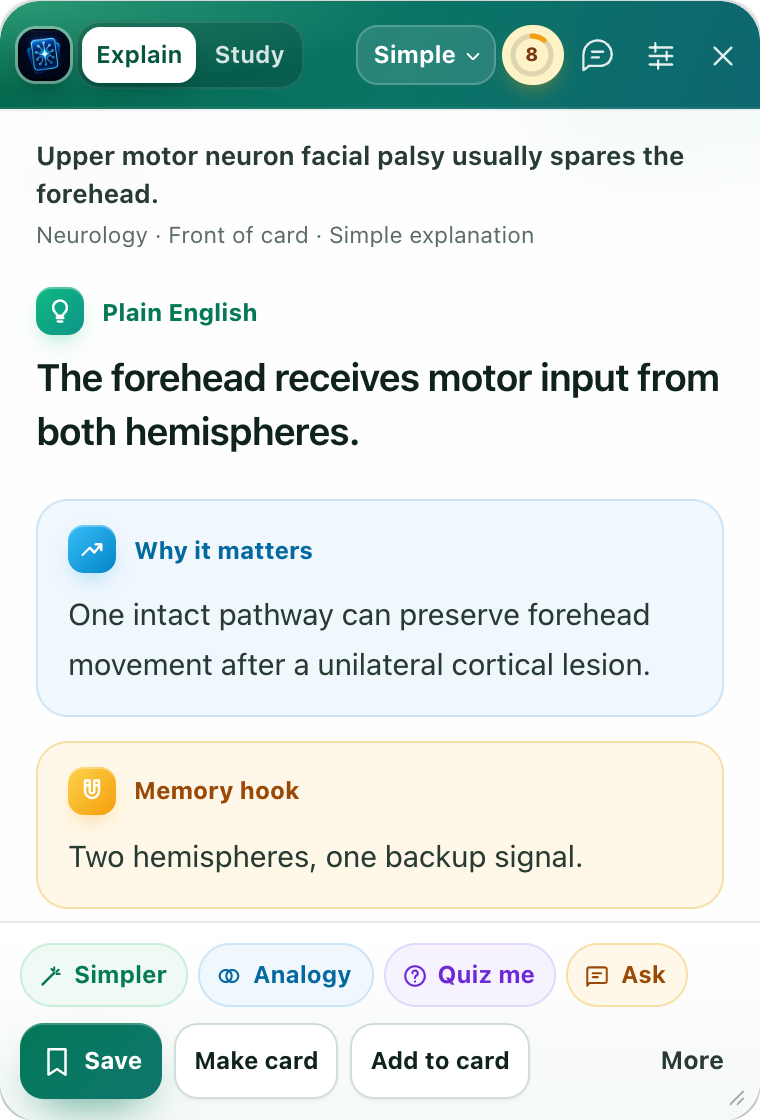
On the answer side you can point it at the Front or Back instead of Auto. It works with text cards, image cards and diagrams, up to three images per card. AI can make mistakes, so check important facts against your sources.
Explain and follow-ups send the card content (text, fields and tags), attached images, your question, and relevant conversation and review context to the hosted service. Nothing is sent until you ask. What is sent.
Keep the explanation on the card
An explanation is most useful where you’ll see it next time. Under any answer, choose Add to card, pick a field (Anki-GPT suggests one such as Extra, Back Extra or Notes), check the preview and confirm. If the note already has a pinned explanation, the button says Replace in card.
The explanation becomes part of your note, so after you sync it shows on AnkiMobile and AnkiDroid wherever that field appears on your card template. Pinning uses no AI answer, and Edit → Undo reverses it.
Two other ways to keep it: Make card turns an explanation into one to three new cards that you edit before adding, and Save to Study keeps it in the add-on for practice with the answer hidden. Study ratings never change your Anki schedule.
FAQ
Should I ask “why” on every Anki card?
No. Ask on cards you got wrong, guessed or keep confusing with another card, and on new cards that depend on an idea. Plain facts and cards you know well don’t need it, and skipping them keeps reviews quick.
Where should I put explanations on my Anki cards?
On the back, in a field such as Extra or Back Extra, so you see it after you answer. Keep the front to the question alone, or the explanation turns into a hint.
What’s the difference between Simple, Exam and Deep?
Simple gives the main idea in plain English. Exam gives the clue, the reasoning and a trap to avoid. Deep covers the mechanism and how the ideas connect.
Will explanations show on my phone?
The panel runs in desktop Anki only. If you pin an explanation with Add to card, it’s saved in a field of your note, so after you sync it shows on AnkiMobile and AnkiDroid wherever that field appears on your card template.
How many AI answers does an explanation use?
One per explanation and one per follow-up. Pinning with Add to card and reopening a saved explanation use none. You start with 30 free AI answers and then keep 5 free explanations a day; for more, Plus is $3 a month or $24 a year, and Pro is $8 a month or $59 a year.
Can it explain image cards and diagrams?
Yes, with up to three images per card. Image quality and missing context can affect an answer, so check it against your source.
Ask “why” without leaving the card.
Free to try with 30 AI answers. No API key, no sign-up. For desktop Anki 2.1.65 or newer.
- In Anki, choose Tools → Add-ons → Get Add-ons.
- Paste 853364085, then restart Anki.
- Start reviewing and click Explain beside a card.