The short answer
Each time you press Again on a card that’s in review, Anki counts a lapse. When a card reaches the leech threshold, 8 lapses by default, Anki shows “Card was a leech”, adds the tag leech, and depending on your deck options either keeps it in your reviews or suspends it.
The tag doesn’t fix anything. A card that has failed eight times usually has a problem with the card, not with your memory. The fix is to change the card.
What “Card was a leech” means
A lapse is when you forget a card that had already graduated to review, by pressing Again. Pressing Again while a card is still in learning or relearning doesn’t add a lapse.
Two settings decide what happens next. Both live in the deck options, in the Lapses section:
| Setting | What it does |
|---|---|
| Leech threshold | How many lapses mark a card as a leech. The default is 8. After that, Anki warns again every half-threshold: every 4 more lapses with the default. |
| Leech action | Tag Only adds the leech tag and keeps the card in your reviews. Suspend Card adds the tag and suspends the card until you unsuspend it. Check which one your preset uses. |
Settings belong to a preset, so decks that share a preset share these values.
Find every leech in your collection
- Open the Browser and search
tag:leech. - To see only the ones Anki suspended, search
tag:leech is:suspended. - Right-click a column header and add Lapses, then sort by it to see the worst cards first.
Not every struggling card is tagged yet. A card at five or six lapses is often heading the same way, so it’s worth looking at your most-failed cards too. See how to spot why a card keeps failing before it becomes a leech.
Why cards become leeches, and how to fix each one
Most leeches fall into one of five patterns. Read the card cold, as if you’d never seen it, and ask which one fits.
The question is unclear
The front could be asking several things, so you guess which answer the card wants. A single word or a bare topic on the front is the usual sign.
- Front
- Mitochondria
- Back
- ATP
- Front
- What does the mitochondrion mainly produce for the cell?
- Back
- ATP, through cellular respiration.
Fix: ask exactly one question, with enough context that only one answer fits.
Too much on one card
The back holds a list or several facts. You remember most of it, miss one part, and fail the whole card.
- Front
- What are the three branches of the US government, and what does each do?
- Back
- Legislative makes laws, executive carries them out, judicial interprets them.
- Front
- Which branch of the US government makes laws?
- Back
- The legislative branch (Congress).
Fix: split it into one fact per card, or use one cloze deletion per item.
Look-alike interference
Two cards look so similar that you swap their answers: ser and estar, affect and effect, two functions with nearly the same name. Learning one makes the other harder.
- Front
- La sopa ___ fría. (ser / estar)
- Back
- está
- Front
- The soup has gone cold (a state right now, not what soup is). Ser or estar? La sopa ___ fría.
- Back
- está (estar): a condition at the moment. Compare: La sopa es de tomate (ser: what it’s made of).
Fix: put the deciding clue on the front and the contrast on the back. A single comparison card can help too. See four ways to tell look-alike cards apart.
A missing foundation
The card depends on an idea you never learned, so there’s nothing for the answer to attach to.
- Front
- What does
[x * 2 for x in nums if x > 0]return? - Back
- A list of each positive number in nums, doubled.
- Front
- In a Python list comprehension, what does the
ifpart do? - Back
- It keeps only the items where the condition is true.
Fix: make a card for the prerequisite idea. You can suspend the leech until that new card feels easy.
Memorized without meaning
You can recite the answer but not use it, so it falls apart when anything looks different.
- Front
- Ohm’s law
- Back
- V = IR
- Front
- A 2 Ω resistor carries 3 A. What is the voltage across it?
- Back
- 6 V, because V = I × R.
Fix: ask for an application or the reason, and add a one-line why or a memory hook on the back.
Two more to rule out. Sometimes the back accepts more than one right answer, so make it exact. And sometimes a card is fine and just needs a few more reviews, for example after a break. Not every leech needs a rewrite.
A leech-fixing routine
- Search
tag:leechin the Browser and start with the cards that have the most lapses. - Read each card cold and name the cause from the list above.
- Rewrite it, split it, or add the missing foundation card.
- Bring it back: select the card, then use Notes → Remove Tags… to remove
leech, and Cards → Toggle Suspend if Anki suspended it. - Prefer a clean start? Add the rewrite as a new card and suspend the old one. Editing a card keeps its review history and lapse count.
Let Card Rescue diagnose them for you
Card Rescue, new in Anki-GPT 0.7, does the triage above inside desktop Anki. It reads Anki’s review history on your computer, read-only, and lists your leech cards and the cards you’ve failed most in the last 7, 30 or 90 days.
Click Diagnose on a card and you get:
- the likely cause, from the same patterns above, plus ambiguous answers and cards that just need time;
- the idea behind the card, explained plainly, and a memory hook;
- a suggested rewrite beside your original with every change highlighted, or a split into smaller cards.
Edit the suggestion, then Apply to this card, Add as new card (optionally suspending the original), or add the split cards.
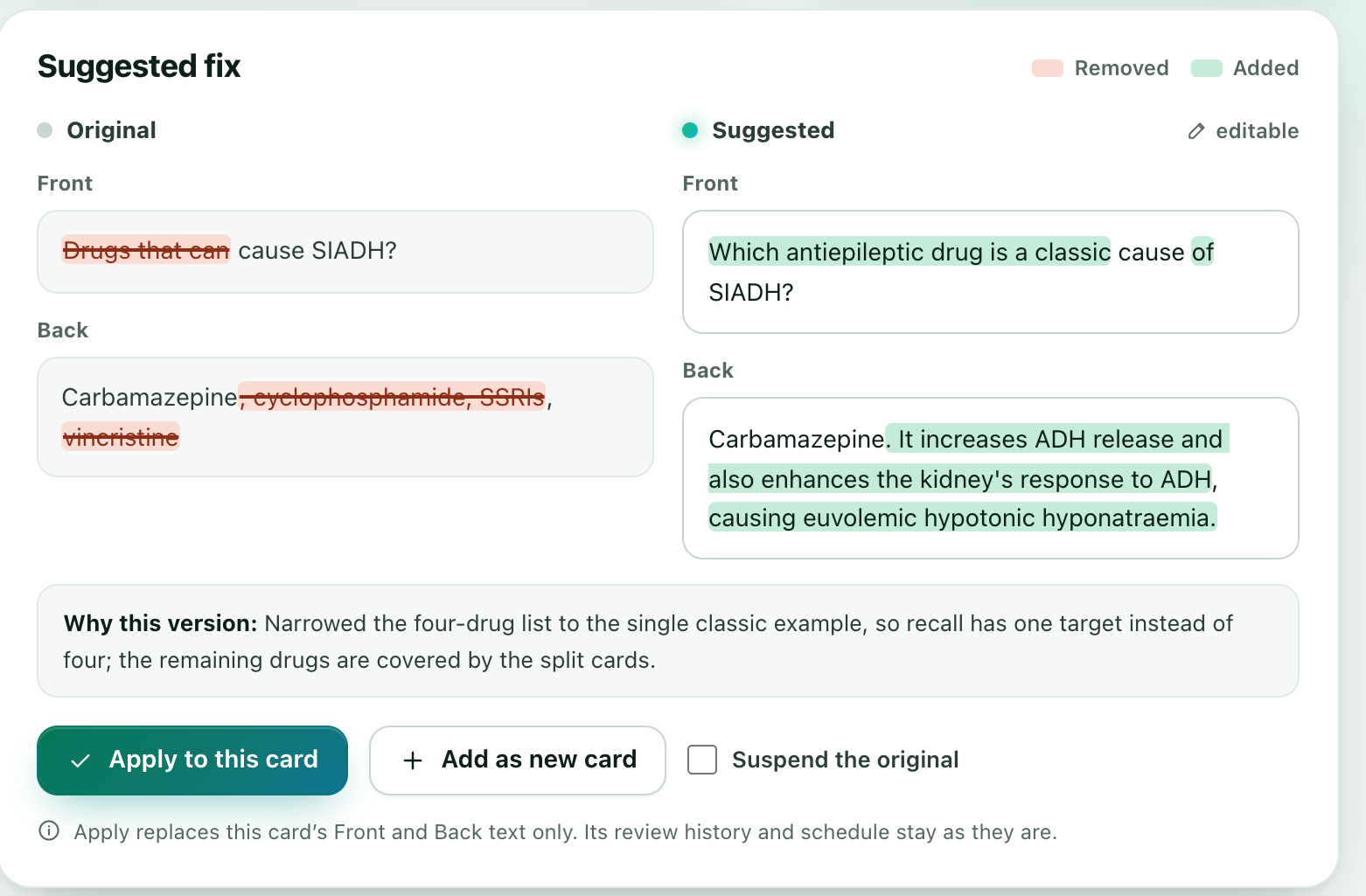
Card Rescue never changes your review schedule or history, and it doesn’t remove the leech tag or unsuspend cards for you. Nothing is written until you click, and Edit → Undo reverses it. Each diagnosis uses one AI answer; reopening one is free. AI can be wrong, so the original card stays beside the suggestion.
FAQ
What does “Card was a leech” mean in Anki?
The card has reached your deck’s leech threshold: you’ve pressed Again on it as a review card that many times (8 by default). Anki adds the tag leech and, if the leech action is Suspend Card, also suspends it.
How many lapses make a card a leech?
8 by default. You can change it in the deck options under Lapses → Leech threshold. After the first warning, Anki warns again every half-threshold, so every 4 more lapses with the default.
Should I suspend leeches or just tag them?
Tag Only keeps the card in your reviews with the leech tag. Suspend Card takes it out until you unsuspend it. Either way the card itself hasn’t changed, so the useful step is to fix the card and then bring it back.
How do I find all my leech cards?
Open the Browser and search tag:leech. Add is:suspended to see only the ones Anki suspended, and add the Lapses column to sort by how often each card was forgotten.
Does editing a leech reset its lapse count?
No. Editing a card’s text keeps its review history and lapse count. If you want a clean start, add the rewrite as a new card and suspend the old one.
Can AI fix leech cards automatically?
Card Rescue suggests a diagnosis and a rewrite, but nothing changes until you click Apply or Add, and Edit → Undo reverses it. It never changes your review schedule. AI can be wrong, so the original card is always shown beside the suggestion.
Try Card Rescue on your own leeches.
Free to try with 30 AI answers. No API key, no sign-up. For desktop Anki 2.1.65 or newer.
- In Anki, choose Tools → Add-ons → Get Add-ons.
- Paste 853364085, then restart Anki.
- Open Tools → Anki-GPT: Rescue struggling cards…